Voltara Gen2 is a full rewrite of the Voltara ESC stack, not a polite little patch with a new label slapped on. If you are trying to work out what changed, whether your hardware can use it, and how to migrate without turning setup night into a support-ticket hobby, this page is the straight answer.
TLDR: What you actually need to know
- Gen2 is a ground-up rewrite, with a new bootloader, new main firmware, new commutation logic, and a new configurator.
- Existing Voltara ESC hardware can migrate, but it is a one-time process. After that, future updates use the normal configurator path.
- Claimed performance ceiling is up to 700,000 eRPM, which matters for high-KV, small-motor, racing, and oddball builds that tend to upset older firmware.
- Protocol support includes DShot up to 2400, bidirectional DShot with EDT, and analogue PWM with auto-calibration.
- Best for: Pilots who want direct ESC behaviour, wider flight-controller compatibility, 3D support, and more tuning control.
- Avoid if: You want the ESC to hide a bad flight-controller tune. Gen2 is described as intentionally direct, which is another way of saying it will stop babysitting your PID mistakes.
What is Voltara Gen2 ESC firmware?
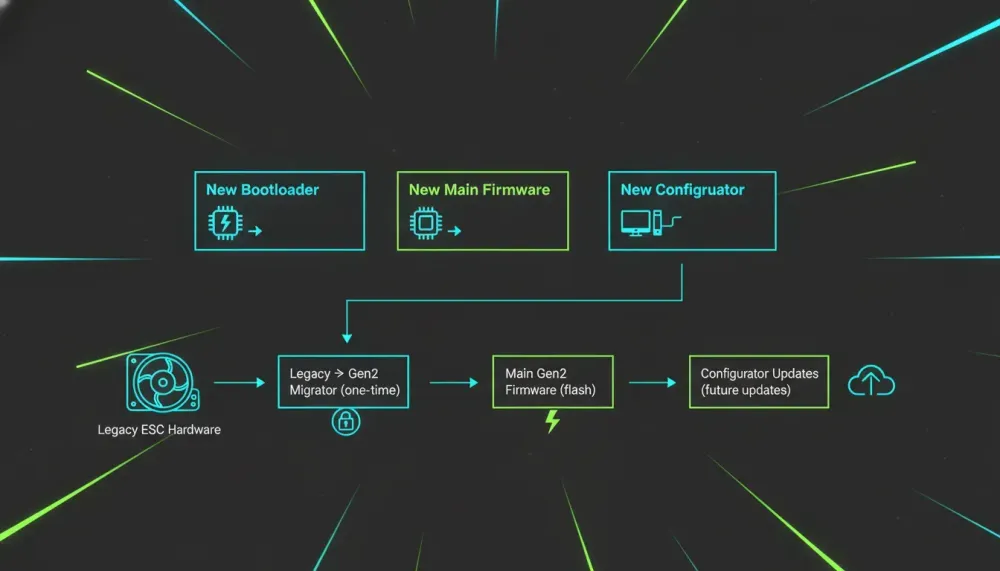
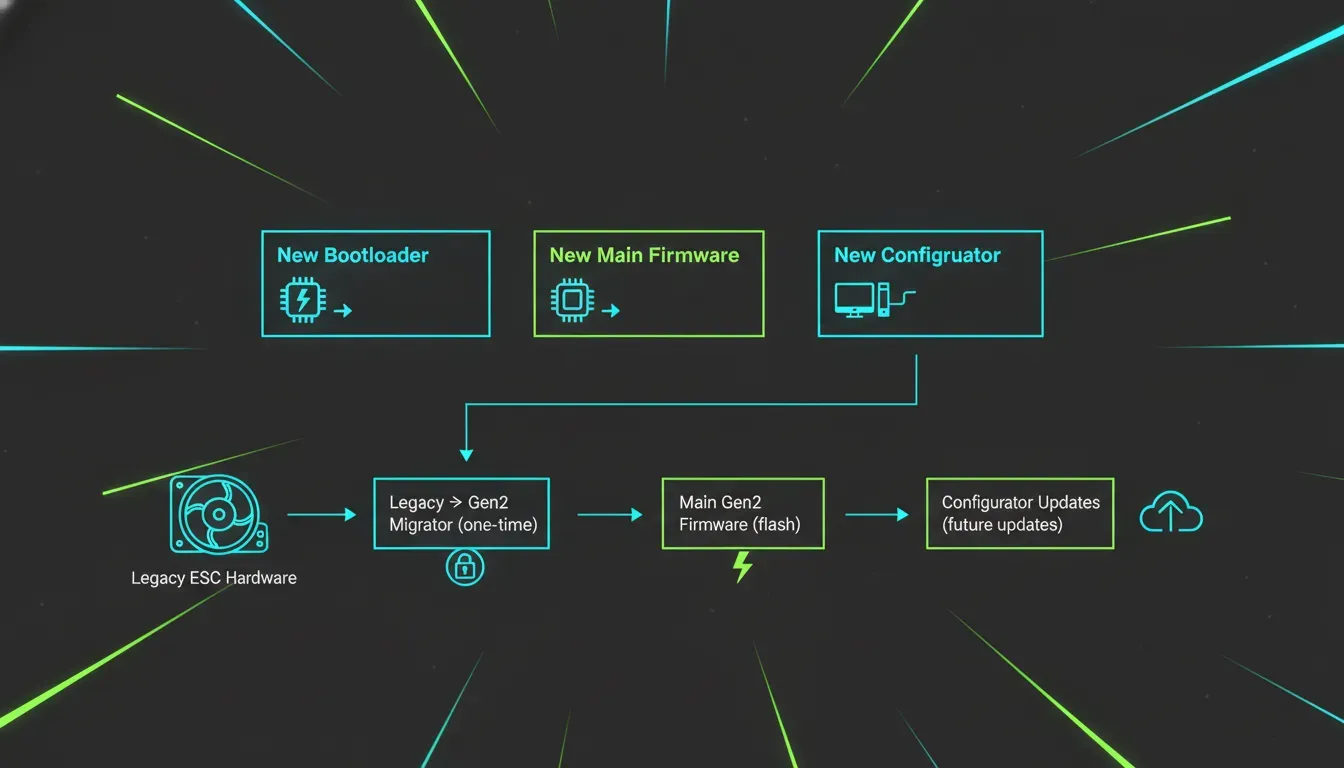
Voltara Gen2 is a new firmware ecosystem for Voltara ESCs. It combines three parts, a rewritten bootloader, a rewritten main firmware core, and a new configurator intended to work across different flight-controller firmware stacks.
That distinction matters because this is not just “legacy, but with a few more settings”. The bootloader changes flashing and rescue behaviour, the main firmware changes motor control logic, and the configurator changes how updates and setup are handled. Same ESC hardware, very different software stack.
So what? If you already own Voltara hardware, this is a platform change rather than a cosmetic version bump.
Why does Voltara Gen2 exist?
It exists because older ESC assumptions stop working when FPV builds get faster, smaller, stranger, or generally less polite. The stated reasons behind Gen2 include the need for more eRPM headroom, more direct response, more configurability, broader flight-controller compatibility, and proper 3D support.
The old firmware was described as stable, but stability is not the same as keeping pace with modern motor behaviour. Gen2 was built around current FPV use cases rather than legacy compromises. In plain English, the software was rebuilt to deal with what pilots are actually bolting together now, not what seemed sensible a few years ago.
If you want more background on ESC choices in general, our VoltaraRC ESC review is a useful companion piece.
What changed in Voltara Gen2 compared with Legacy?
The short answer is almost everything that matters. Gen2 replaces the bootloader, the main firmware logic, and the configuration workflow.
Main changes mentioned:
- Universal flight-controller compatibility through one configurator and one firmware path, rather than juggling separate builds.
- More direct motor response, with no hidden smoothing intended to mask flight-controller requests.
- Higher eRPM ceiling, up to 700k eRPM.
- Broader protocol support, including DShot up to 2400, bidirectional DShot with EDT, and analogue PWM with auto-calibration.
- More exposed settings, such as timing advance, PWM frequency, ramp-up, ramp-down, and startup power.
- Full 3D support with direction reversal around mid-stick.
The practical difference is that Gen2 is aimed at both normal 5-inch builds and weird edge-case projects. Which is handy, because FPV people are physically incapable of leaving “good enough” alone.
Does Voltara Gen2 improve compatibility with Betaflight, KISS Ultra, and iNav?
Yes, broader flight-controller compatibility is one of the main design goals. Gen2 is described as working across Betaflight, KISS Ultra, and iNav, provided ESC pass-through is supported.
The relevant point is not just that it works with multiple FC ecosystems, but that the same configurator is meant to handle them. That cuts down on the usual nonsense of hunting for the correct flashing tool or wondering which firmware branch applies to which stack.
Takeaway, if your setup supports ESC pass-through, Gen2 is intended to use a single workflow rather than a pile of “special cases”.
How does Voltara Gen2 ESC firmware behave in flight?
It is meant to be very direct. The firmware tracks flight-controller corrections in real time and deliberately avoids smoothing that can make a bad tune feel less bad than it is.
That sounds great until someone cranks random settings because the internet told them “more aggressive” is always better. The caution here is explicit, tune the flight controller first, then the ESC. If you are not sure what a setting does, leaving it on auto is the sane option.
Default settings are stated to be tuned for normal 5-inch freestyle and racing builds. So if your quad is conventional, resist the urge to “optimise” it into a smoking lesson.
How high is the Voltara Gen2 eRPM limit, and who needs it?
The claimed ceiling is up to 700,000 electrical RPM. That is positioned as a major increase in headroom over the legacy firmware.
This matters most for:
- small motors
- high-PWM or high-performance setups
- lightweight race quads
- experimental builds
- specialty projects that push motor speed limits
If your build is a normal freestyle 5-inch, the headline number is less dramatic than the compatibility and tuning changes. If your build is weird, fast, tiny, or all three, the extra headroom is the point.
Does Voltara Gen2 support 3D mode properly?
Yes, full 3D support is one of the explicit additions in Gen2. It supports bidirectional throttle with direction reversal through mid-stick.
The setup path is simple on paper. Enable 3D in the flight controller, then enable bidirectional mode in the configurator. The stated goal is to provide the same response and protection behaviour whether the model is upright or inverted.
Takeaway, if you wanted proper 3D support on Voltara hardware, Gen2 is the firmware generation designed to provide it.
What protections and telemetry does Voltara Gen2 include?
Gen2 includes both protection systems and telemetry support, and that matters more than the flashy performance bullets. Fast is nice. Fast while not cooking itself into modern art is nicer.
Protection functions mentioned:
- soft current limiting
- temperature rollback
- shorted FET detection at boot
- motor winding short checks
- driver fault handling
- in-flight stall recovery
The protections are described as intelligent interventions rather than immediate shutdowns, unless necessary. That suggests the system tries to preserve control before resorting to brute-force cut-off.
Telemetry support mentioned:
- regular serial telemetry
- bidirectional DShot telemetry
- voltage
- current
- RPM
- temperature
- current consumption
- ESC temperature and voltage through extended telemetry options
One caveat is stated clearly, not all available telemetry is fully used by Betaflight yet. The support exists, but some of the ecosystem still needs to catch up.
How do you migrate from Voltara Legacy to Gen2?
You use the dedicated Legacy-to-Gen2 migrator in the configurator, then flash the main Gen2 firmware. It is a one-time migration path for existing hardware.
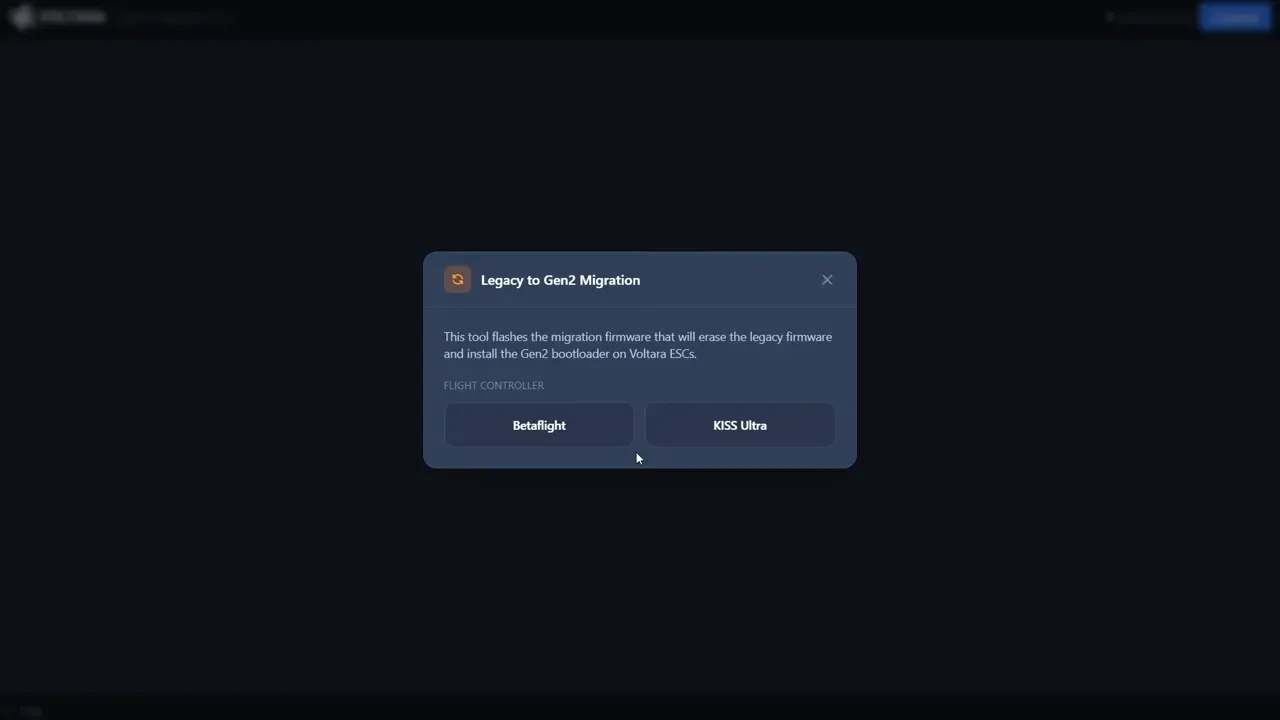
The process described is:
- Power the ESC and connect the flight controller.
- Open the configurator and launch the Legacy to Gen2 Migrator.
- Select the correct flight-controller type.
- Select the correct ESC hardware type.
- Connect and flash the migration firmware.
- Power-cycle the ESC, and preferably the flight controller USB connection too.
- Reconnect through pass-through once the Gen2 bootloader is active.
- Go to the firmware tab and flash the main Gen2 firmware to all detected ESCs.
- Power-cycle again so the new firmware writes settings to the board.
The biggest avoidable mistake is selecting the wrong ESC hardware type during migration. That does not sound glamorous, but it is exactly the kind of setup error that wastes an evening and teaches new swear words.
Practical takeaway, migration is not difficult, but it is not the time for guesswork. Match the correct FC type and exact ESC hardware before flashing anything.
How do you use the Voltara Gen2 configurator?
The configurator handles both firmware management and ESC settings through pass-through. Once connected, it can detect multiple ESCs and apply settings either globally or per ESC, depending on the selected tab.
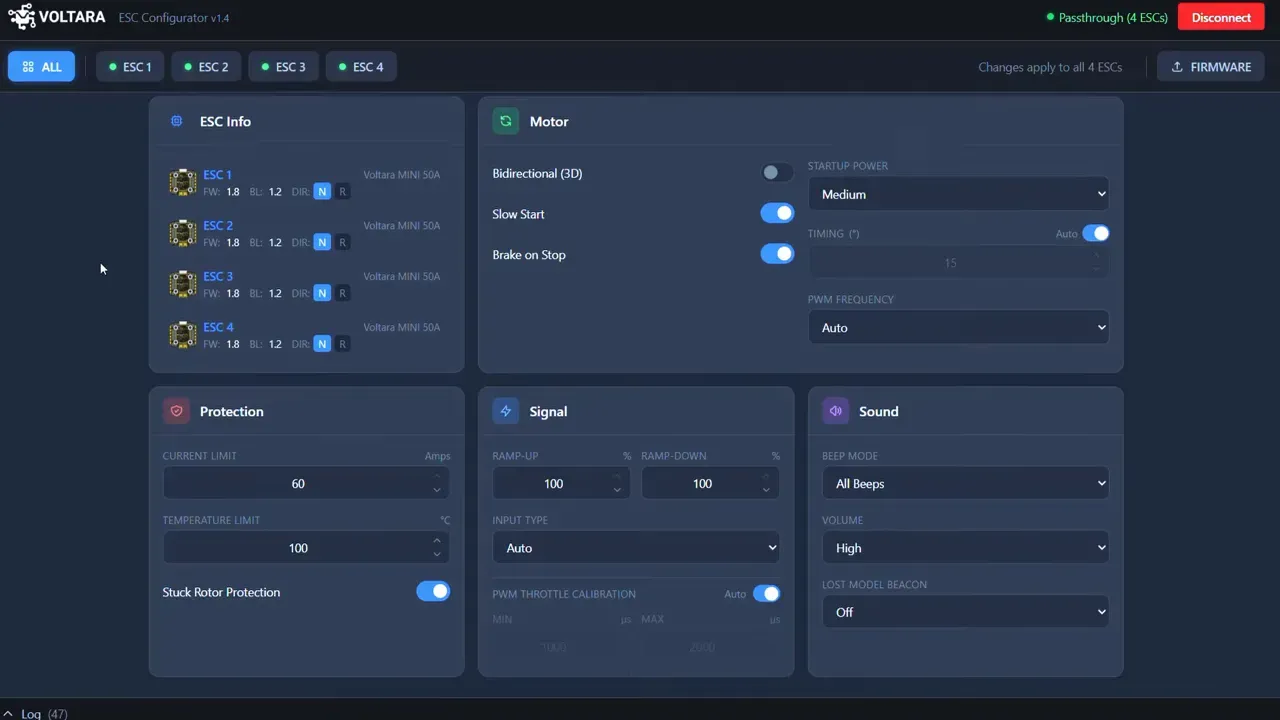
Functions shown in the configurator include:
- reading detected ESCs
- flashing firmware
- changing motor direction per ESC
- configuring motor behaviour and protections
- setting signal options and beeper behaviour
The first connection after flashing appears to default to an “all ESCs” view, which is useful for bulk changes. Individual motor rotation can then be changed separately where needed.
Takeaway, the configurator is not just a flashing tool. It is the normal operating interface for setup, updates, and per-ESC changes.
Which Voltara Gen2 settings should you change, and which should you leave alone?
For most builds, leave the advanced settings on auto. That is the sane path, and the transcript is fairly blunt about it.
Settings exposed in the configurator include:
- startup power
- timing
- PWM frequency
- bidirectional mode for 3D
- slow start
- brake on stop
- current limit
- temperature limit
- stuck rotor protection
- ramp-up
- ramp-down
- input type
- PWM throttle calibration
- beep mode
- beep volume
- lost model beacon timer
The defaults are said to suit regular 5-inch freestyle and racing setups. Manual tuning is more relevant for unusual motors, high-voltage projects, large props, or experimental builds.
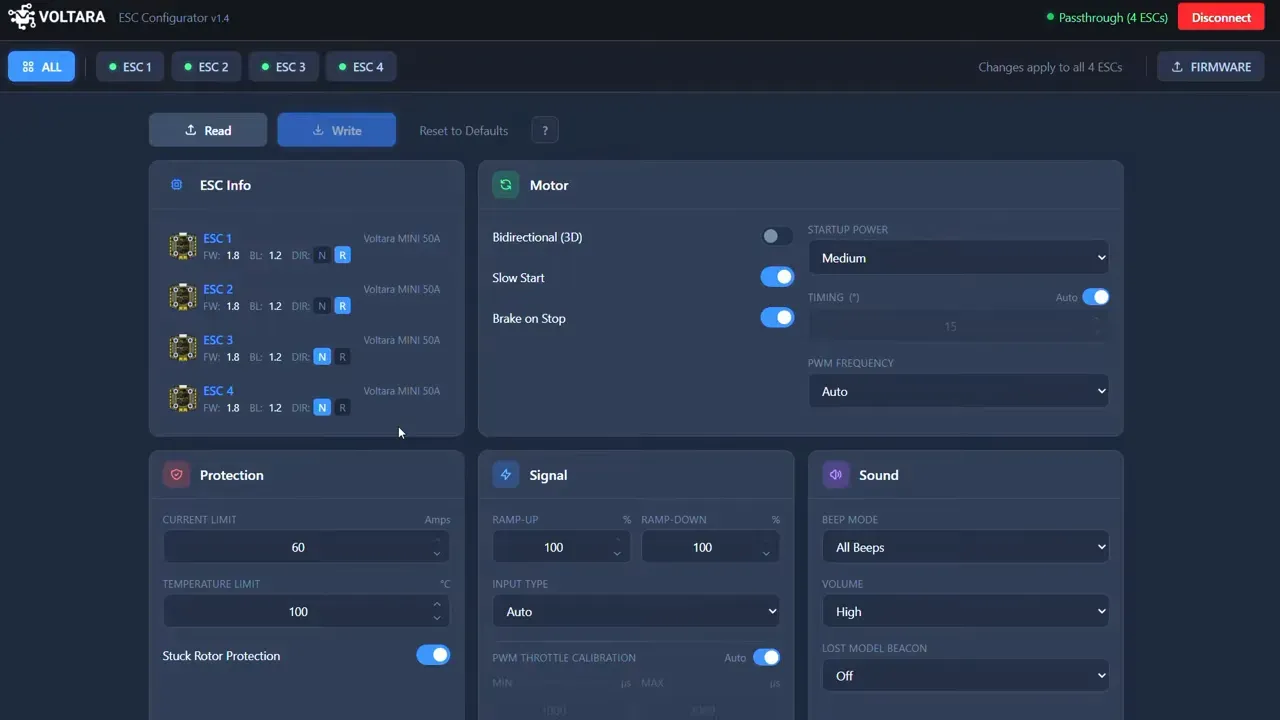
Good rule of thumb:
- If you know exactly why you are changing timing or PWM frequency, proceed.
- If you do not, auto exists for a reason.
- If your tune is poor, fix that before touching ESC settings.
What are the common mistakes when setting up Voltara Gen2 ESC firmware?
The usual mistakes are wrong hardware selection, changing advanced settings blindly, and using ESC tuning to hide a bad FC tune. None of these are new problems, but Gen2 is less interested in flattering bad setup choices.
Watch for these:
- Wrong ESC type during migration. This can apply incorrect settings.
- Skipping power cycles. The process includes power-cycling after migration and after flashing the main firmware.
- Assuming direct response means “better” on an untuned quad. It may just reveal the tune is poor.
- Changing auto values without a reason. Startup power, timing, and PWM frequency are not decorative sliders.
- Forgetting 3D requires both FC and ESC setup. One side alone will not do it.
If you are building or rebuilding a 5-inch quad around a new ESC stack, our guide to essential FPV parts for a 5-inch drone can help keep the rest of the system sensible.
Is Voltara Gen2 worth installing?
Yes, if you already use Voltara ESC hardware and want the added compatibility, configurability, 3D support, and higher eRPM ceiling. That is the obvious use case.
It looks especially relevant for builders running unusual setups, small high-speed motors, or mixed flight-controller ecosystems. It is also useful if the old firmware’s limitations were the thing stopping a build from behaving.
If your main goal is a softer-feeling setup that hides tuning problems, this is not the firmware philosophy being presented. Gen2 appears to favour direct control over hand-holding.
Takeaway, Gen2 is a meaningful upgrade if you want control and headroom. It is not a magic trick for bad tuning.
FAQ
Can existing Voltara ESC hardware run Gen2?
Yes. Existing hardware can migrate through a one-time process in the configurator. After that, future updates use the normal Gen2 path rather than the migration tool again.
Does Voltara Gen2 need a different configurator from Legacy?
Yes, Gen2 uses a new configurator as part of the new ecosystem. That configurator also handles the migration tool for older hardware and normal firmware flashing after migration.
Does Voltara Gen2 work with analogue PWM?
Yes. The stated protocol support includes analogue PWM with auto-calibration. It also supports DShot up to 2400 and bidirectional DShot with EDT.
Why is Voltara Gen2 not smoothing out my quad?
Because it is not meant to. Gen2 is described as intentionally direct, so poor flight-controller tuning is more obvious. The recommended order is to tune the FC first, then make ESC changes only if needed.
What should I do if Voltara Gen2 migration fails?
First, verify you selected the correct flight-controller type and exact ESC hardware type in the migrator. Then repeat the power-cycle steps carefully. The transcript does not provide a deeper failure-recovery procedure beyond the bootloader and rescue improvements.
Can Voltara Gen2 change motor direction in the configurator?
Yes. Individual ESC rotation can be changed directly in the configurator. That is separate from the global settings view used to apply changes to all ESCs at once.
Does Betaflight use all of Voltara Gen2 telemetry data?
Not fully, according to the transcript. The support is present in Gen2, but Betaflight does not yet use everything exposed by the ESC telemetry path.
This article was based from the video VOLTARA Gen2 ESC FIRMWARE - It's Finally here!