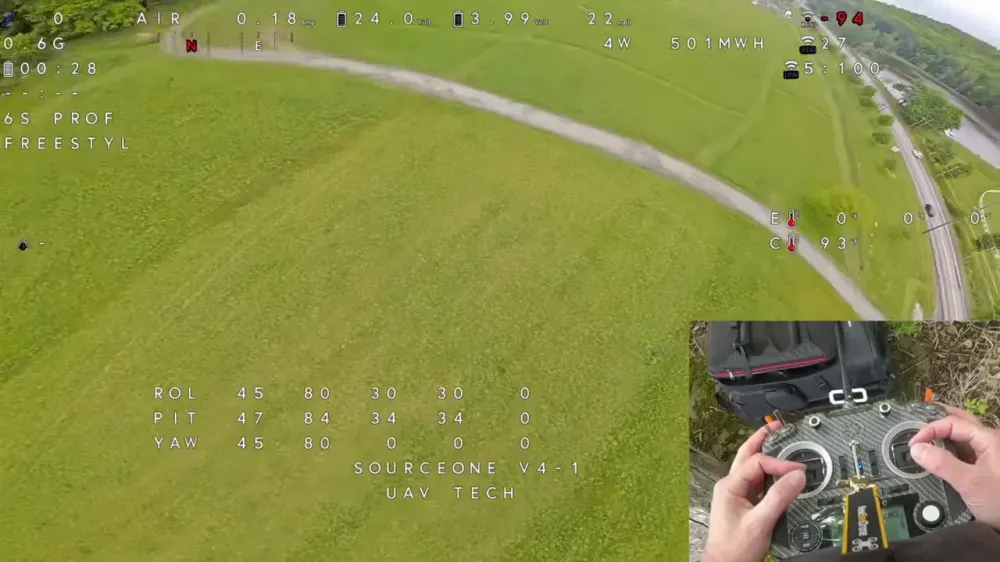
Betaflight now has an autotune tool in the 2026 master branch, and yes, that is exactly the sort of sentence that makes FPV pilots perk up and then immediately distrust it. The feature already looks useful as an analysis tool, but the automatic PID recommendations are not yet at the stage where blind faith is a good life choice.
TLDR: What you actually need to know
- Betaflight Autotune is not in the 2025.12 stable release, it is currently in the master branch aimed at the 2026 release.
- You need three things before it does anything useful, chirp enabled when flashing, a switch assigned to Chirp mode, and Blackbox logging with debug mode set to chirp.
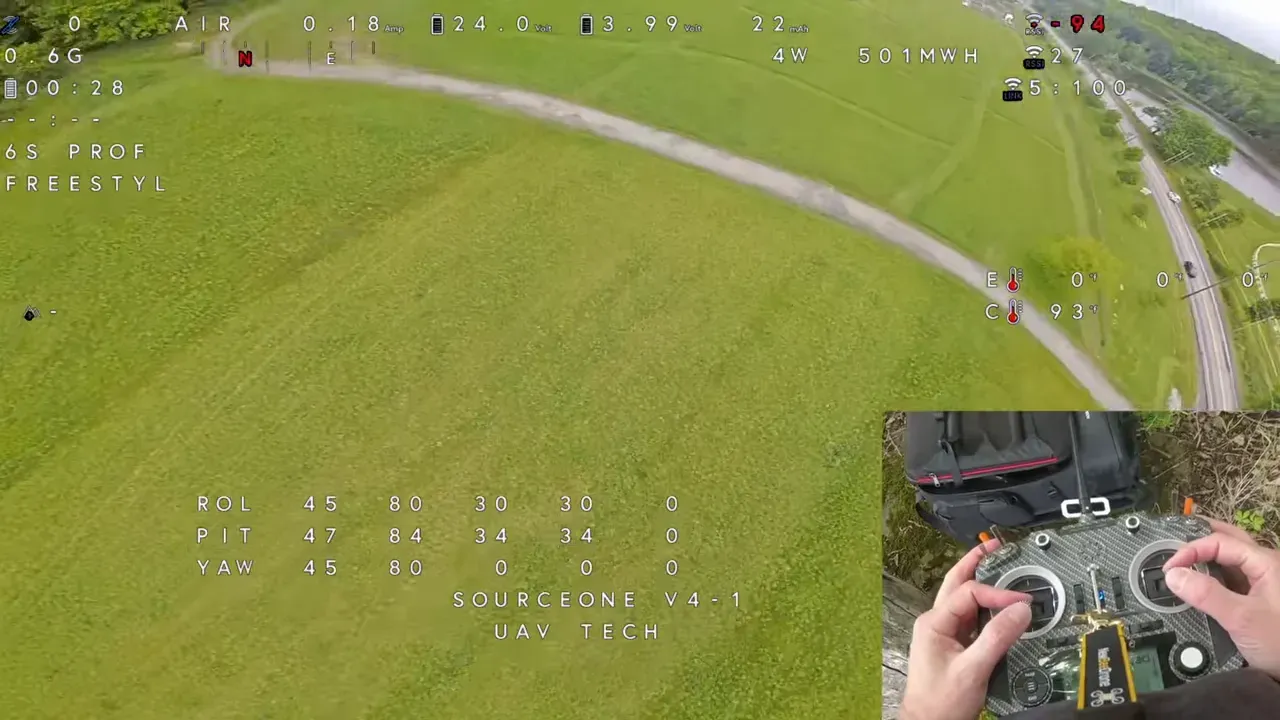
- The flight itself is short, throttle ramps, chirp runs on roll, pitch and yaw, then a few single-axis flips, rolls and yaw moves.
- The graphs are the real value right now, especially the spectrogram, coherence, bandwidth, phase margin and step response.
- The current auto-applied PID recommendations can be wrong, including one case where pitch-specific gains were set to zero, which is an impressively efficient way to ruin take-off.
- Best for: pilots who already understand Betaflight tuning and want a faster way to analyse logs.
- Avoid if: the plan is to click “Apply” and expect one-button perfection, or if the quad is a very large platform running close to default 5-inch assumptions.
What is Betaflight Autotune actually doing?
Betaflight Autotune is analysing a special Blackbox log created during chirp manoeuvres, then estimating how the quad responds across frequency ranges. It is not magic, and it is not yet a finished replacement for understanding PID tuning.
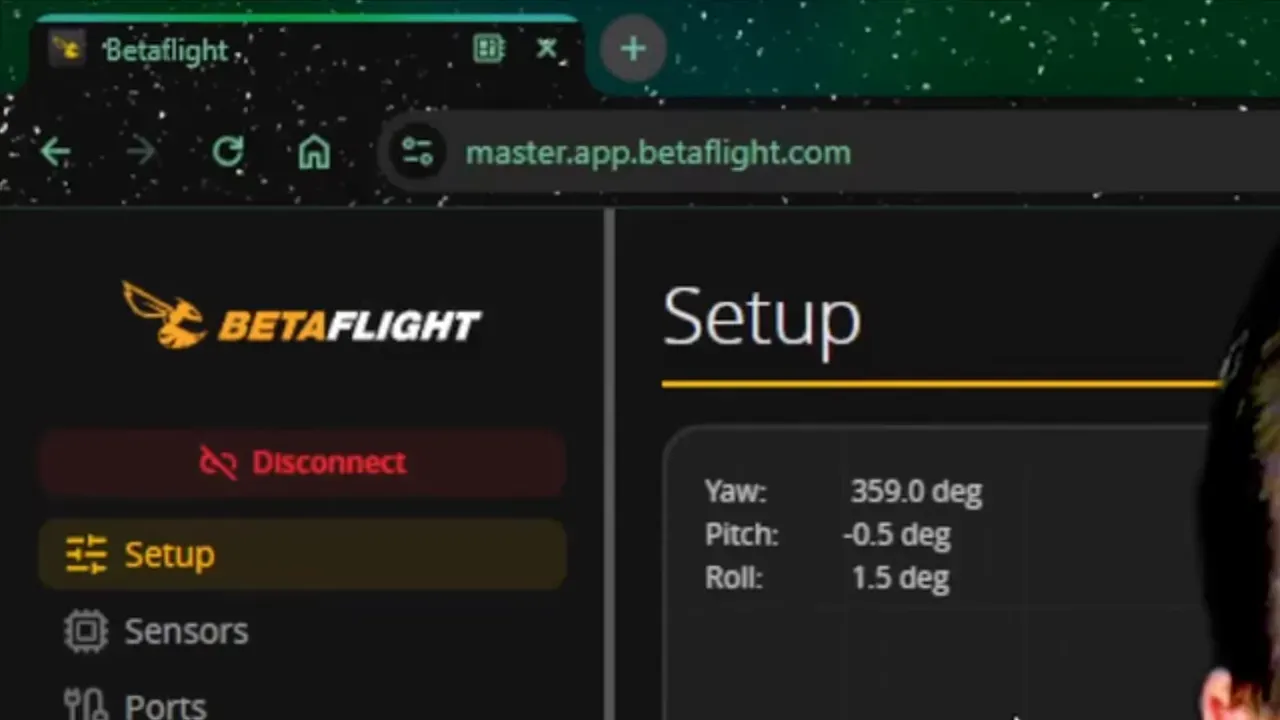
The new page appears in the master configurator at master.app.betaflight.com. It works with connected flight controllers and also allows offline log analysis, which is handy if the quad is elsewhere or the USB cable has entered its usual state of passive-aggressive non-cooperation.
The important distinction is this: the tool already does a decent job of measuring behaviour. Its current attempt at fixing behaviour is the part that still needs supervision.
How to set up Betaflight Autotune without it quietly failing
The setup is straightforward, but missing one item means the log will be useless. Betaflight’s autotune wants the firmware, the mode setup and the logging configuration all lined up.
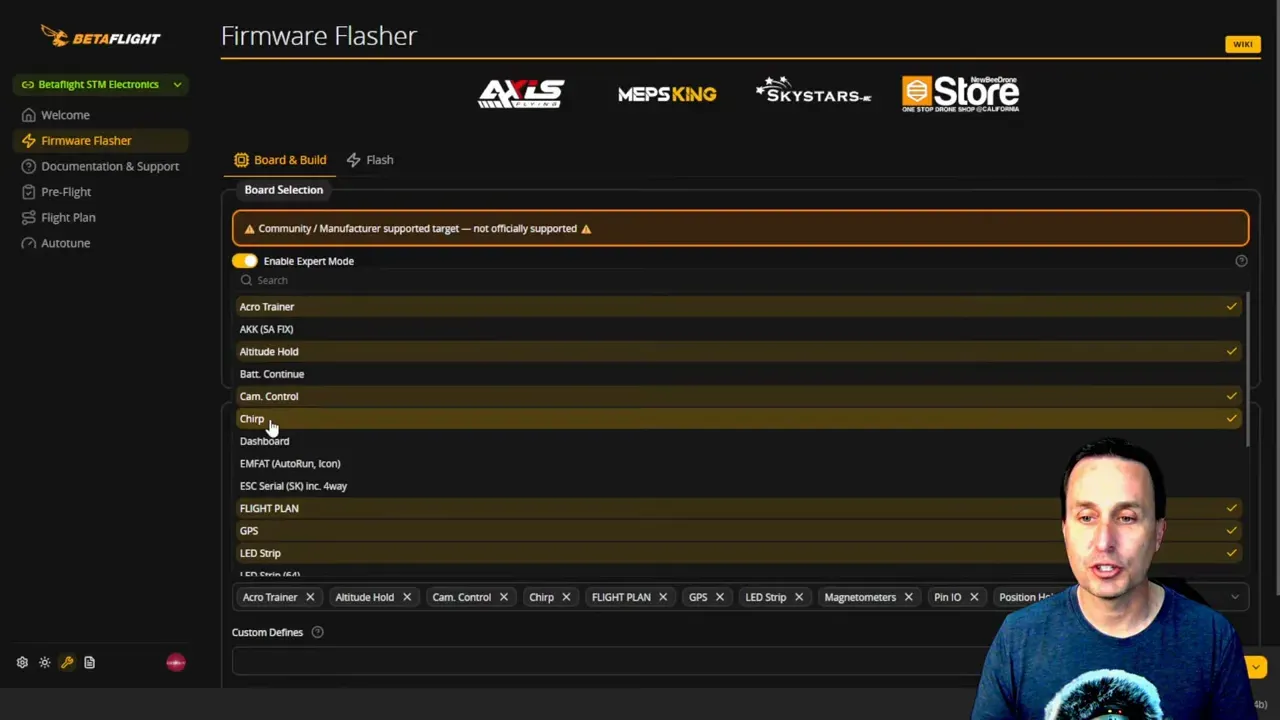
Start with the Betaflight master branch, or the future 2026 stable release once that exists. During flashing, the chirp option must be enabled. Without that, the relevant mode does not appear later, which is less “autotune not working” and more “feature not installed”.
Then assign Chirp mode to a switch in the Modes tab. A middle switch position works well, but any reliable activation method is fine.
Blackbox logging also needs to be active. In the Blackbox settings, set the debug mode to chirp. That part matters because the autotune analyser expects the right debug data.
There is also a CLI setting called blackbox_high_resolution. The Betaflight help material suggests turning it on for extra setpoint precision. UAV Tech does not recommend that at the moment because Blackbox Explorer does not scale the setpoint properly with that option enabled. In practice, chirp mode still works with it off, and life is short.
Before the flight, go to PID Tuning and make a few changes:
- Leave the main sliders at 1.0
- Set stick response to 0
- Set dynamic damping to 0
Those extra features can muddy the chirp analysis. Great in a finished tune, less helpful when the software is trying to measure raw behaviour.
If this is all still a bit abstract, the Betaflight section on the Unmanned Tech blog is a sensible place to brush up on related setup and troubleshooting topics first.
Can Betaflight Autotune work on any quad?
No, not safely by default. It is built around Betaflight defaults that suit something roughly in the 5-inch freestyle or racing class, and that matters.
Smaller classes generally get off the ground fine. Medium-sized builds may still be close enough. Very large drones, think 10-inch and up, can be far enough from Betaflight defaults that the quad may not even take off cleanly.
The main warning here is I gain, especially on big platforms. If a large drone is loaded with default values and sent straight into chirp tuning, it can crash on take-off before any analysis ever happens.
So what? Autotune is not a substitute for basic judgement on unusual airframes. If the build is a large rig, tune it into a safe baseline first, then use chirp as a measurement tool.
How to fly the Betaflight Autotune chirp routine properly
The best chirp flight is short, deliberate and boring. That is good news, because boring test flights usually cost fewer props.
Start with a few throttle ramps. The purpose is to capture motor and vibration behaviour across the throttle range.
Then begin the chirp runs. Switch into Chirp mode while holding a stable line with enough space around the quad. The firmware runs through one axis at a time:
- Roll chirp
- Pitch chirp
- Yaw chirp
- Repeat for a second set
Wait for the OSD message that indicates the chirp execution has finished before moving on. Tiny stick corrections are acceptable if needed to avoid drifting into a hedge, tree or the sort of fence post that appears only when logs are running. Still, the cleaner the input, the better the analysis.
Angle mode can be combined with Chirp mode, but UAV Tech avoids that. The reason is cross-axis stabilisation. In angle mode, pitch, roll and yaw corrections can bleed into each other. In acro, if the pilot does not touch the sticks, there are no extra stabilisation inputs contaminating the data.
After the chirp runs, add a few single-axis flips, rolls and yaw moves. Then land and stop. Do not turn the rest of the pack into a freestyle session. The point is to bring back a clean test log, not an autobiographical novel.
How do you load a Blackbox log into Betaflight Autotune?
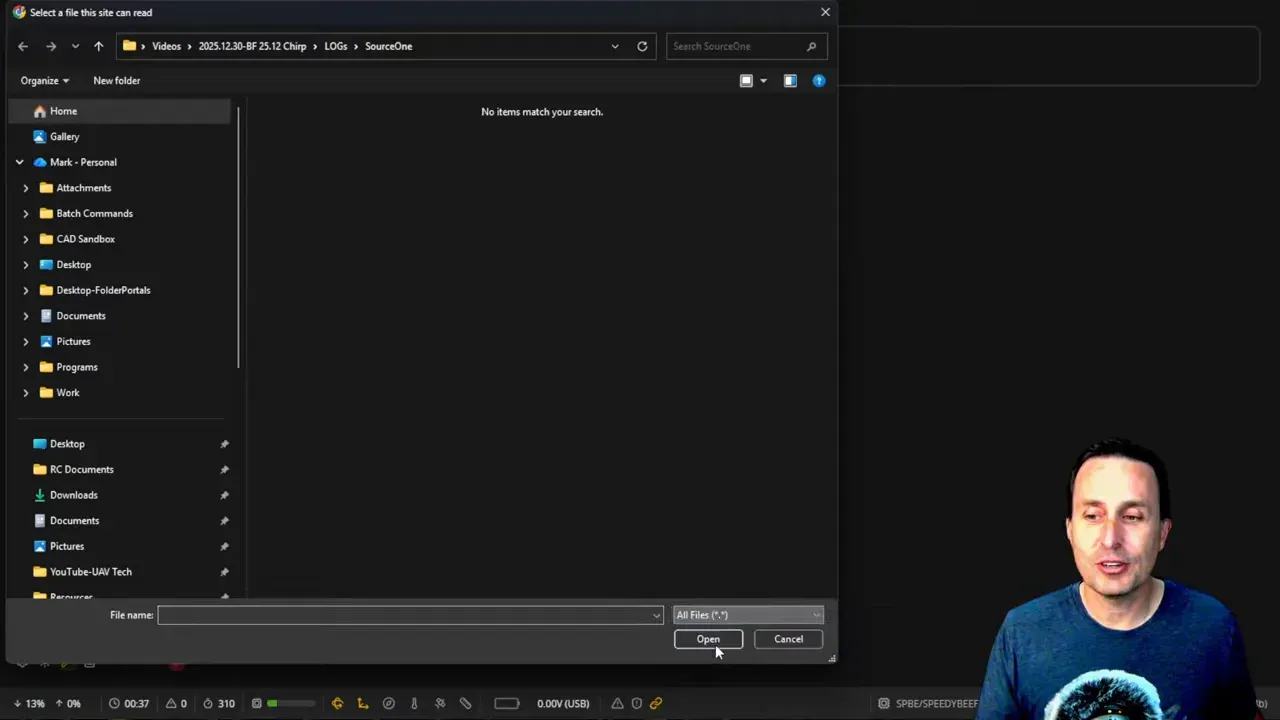
The import process works, but it has one small snag. Betaflight’s own file type is not always recognised automatically by the file picker, because of course it is not.
Back at the computer, open the Autotune page and use Import Blackbox Log. The log can be read straight from flight controller mass storage, but that may run slowly. Copying the file to local storage is cleaner.
If the file browser does not show the log, change the filter to All files. The BFL path is not properly picked up in the current implementation.
Once imported, resist the urge to skip straight to the recommended PID sliders. The graphs are where the useful information lives right now.
What do the Betaflight Autotune graphs mean?
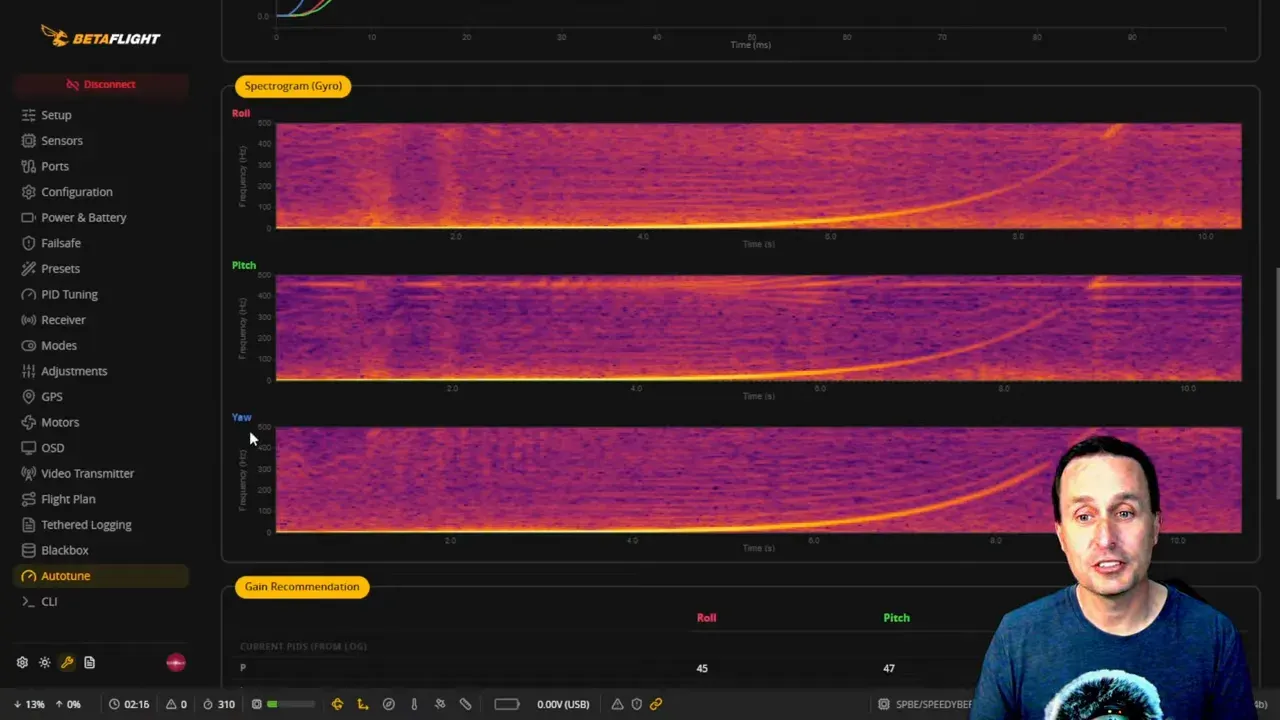
The graphs tell whether the log is valid and how the quad responds across frequency. If the graphs look wrong, the recommendations underneath are just decorative nonsense with a dark theme.
What should the spectrogram look like?
The spectrogram should show a clear bright chirp line sweeping upward in frequency. That line is the test signal. If it is not distinct, throw the log away.
On a good log, the background noise stays relatively dark and the chirp trace stands out clearly on roll, pitch and yaw. If the display is muddy and the chirp line is weak or missing, the analyser is not seeing the excitation properly.
This is the first check to make, before reading anything else. Bad input, bad output.
What are the top response graphs showing?
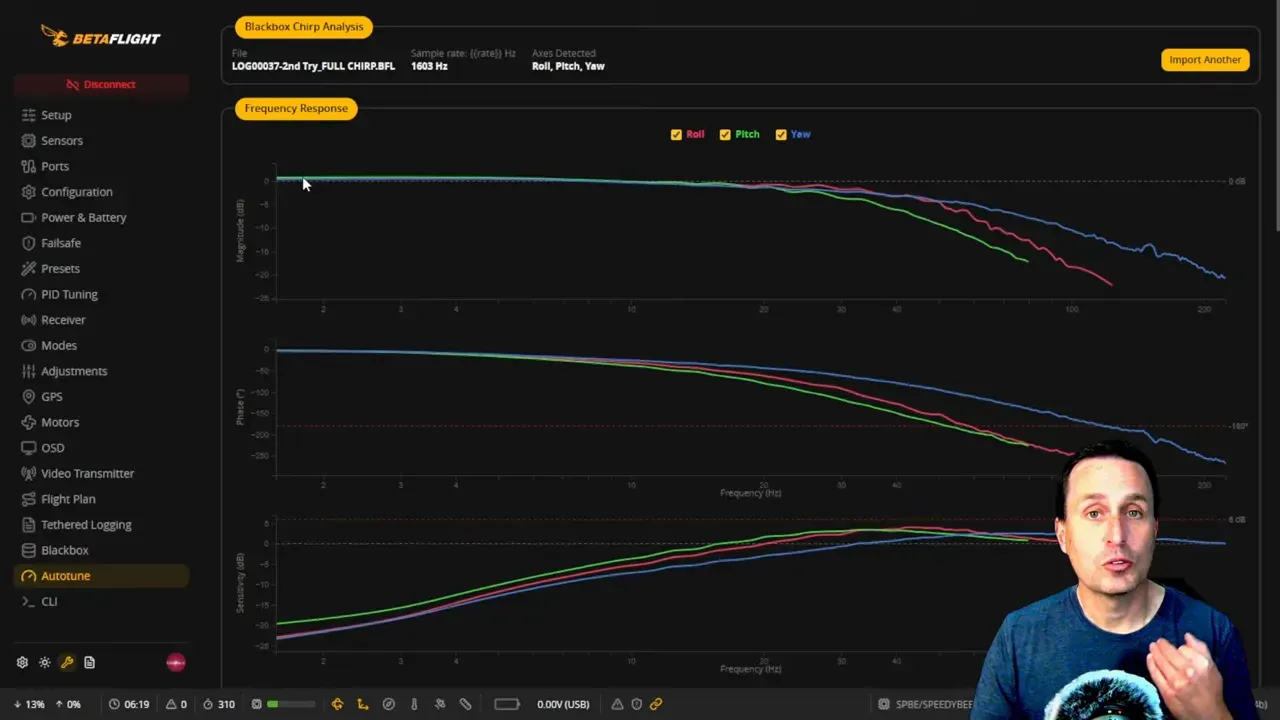
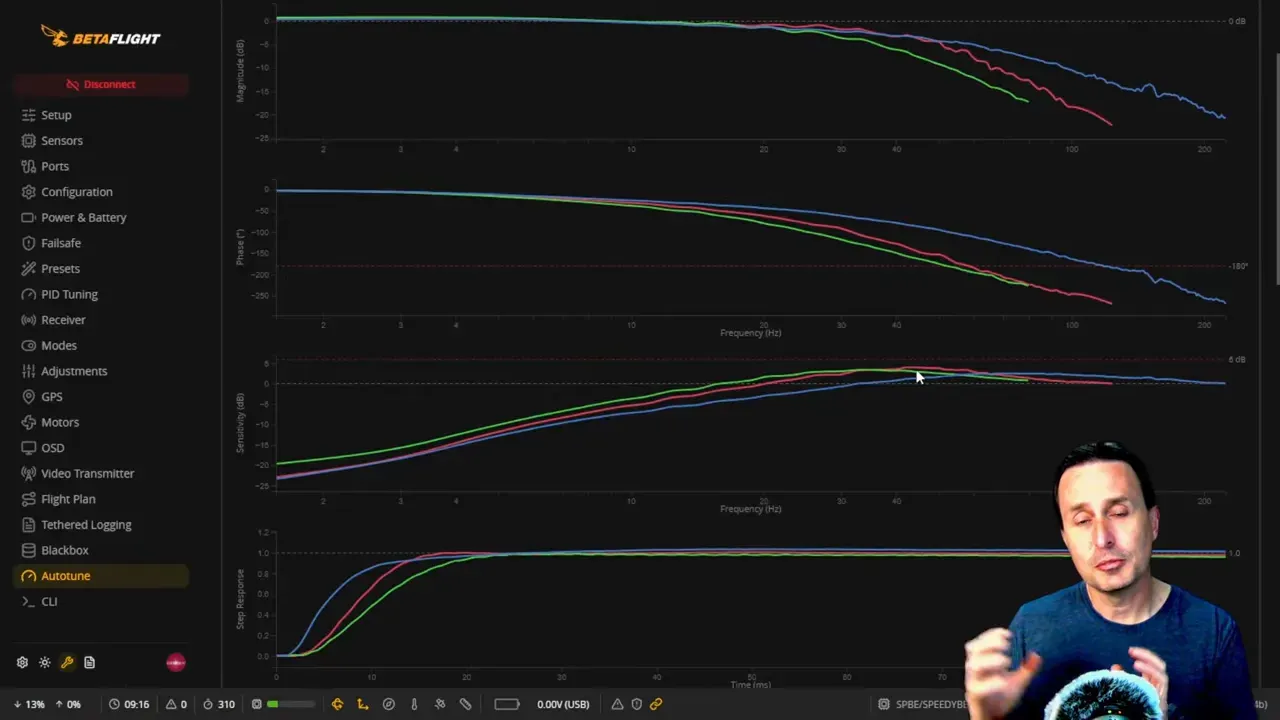
They show how closely the gyro follows the stick-input test signal as the chirp frequency rises. One graph shows magnitude tracking, another shows delay, and another indicates how close the system is to unstable feedback.
At low frequencies, roughly 0 to 10 Hz on the tested 5-inch quad, the quad tracks the input very well. By 20 Hz and above, the response begins to roll off. By the time it is up around 100 Hz, the quad is no longer following the input magnitude closely.
That lines up with what pilots already know from feel. The low-frequency stuff is easy. The high-frequency stuff is where prop wash and control limitations show up.
The graphs also reveal axis differences. In the example, pitch dropped off sooner than roll, meaning pitch was a bit more sluggish. That suggests pitch gains should be raised relative to roll.
What does the sensitivity graph tell you?
It estimates how close the tune is to a feedback loop that can cause D-term oscillation or even a flyaway. A rough rule used here is that around 6 dB is where things get spicy.
If all axes sit well below that, the tune has room to become more aggressive. If one axis starts approaching that region, the gains are getting close to the limit.
So what? This graph is less about comfort and more about headroom. It tells whether there is still performance left on the table.
Why does the step response matter?
The step response shows how the PID loop reacts when the target changes. It is one of the quickest ways to judge whether the P and D balance is sane.
In the example, the step response looked clean. The axes rose without big overshoot or ringing. Pitch lagged slightly compared with roll, which again pointed to a need for higher pitch gains, but the underlying balance was sound.
If the curve overshoots and oscillates, the tune is too aggressive or poorly balanced. If it rises lazily, it is too soft. This is why the graph matters more than any single recommended number below it.
What does the Betaflight Autotune analysis section actually tell you?
The analysis table converts the graphs into numbers that are easier to compare. Some matter more than others.
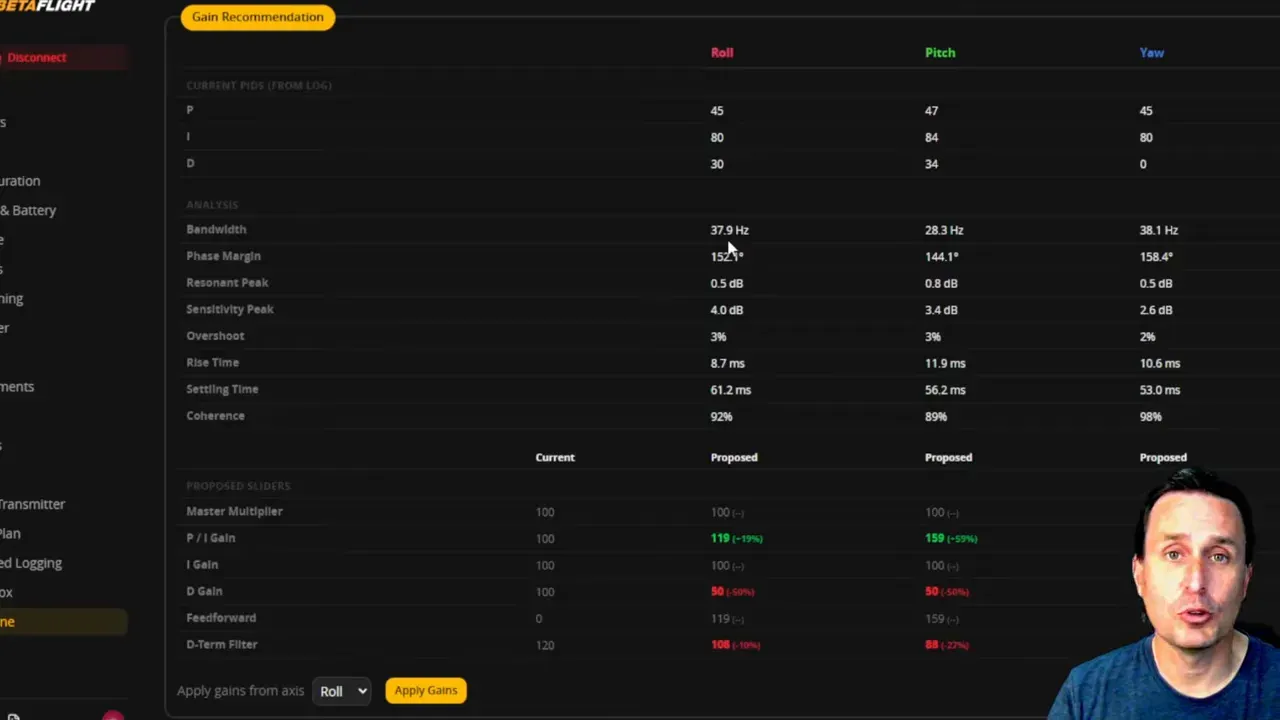
Bandwidth is where each axis starts losing control authority. In the example, roll was around 38 Hz and pitch was around 28 Hz. That is a clear sign pitch gains are too low relative to roll.
Phase margin gives a feel for stability. Numbers above 100 degrees were described as healthy and conservative. If the values get much lower, the tune is closer to the edge. That can help prop wash, but also makes the setup less forgiving.
Resonance peak and sensitivity peak give more clues about proximity to D-term issues. Lower is safer. If these start climbing toward the problematic region, it is time to stop pretending the motors are happy.
Overshoot, rise time and settling time reflect the step response. Rise time can help compare axes. Settling time is useful, but UAV Tech treats it more cautiously because it can fluctuate.
Coherence percentage may be the first number worth checking. High 80s to 90s is good. That means the chirp signal was captured clearly enough for the analysis to be trustworthy.
The practical takeaway is simple. Use these numbers to identify mismatched axes and available tuning headroom, not as a substitute for thinking.
Anyone still choosing hardware for serious logging work may also want the broader FPV racing flight controller buying guide, because Blackbox support is one of those features that becomes very important the moment it is absent.
Are Betaflight Autotune PID recommendations good yet?
Not yet, at least not in the tested build. The recommendations are the weak part of the feature right now.
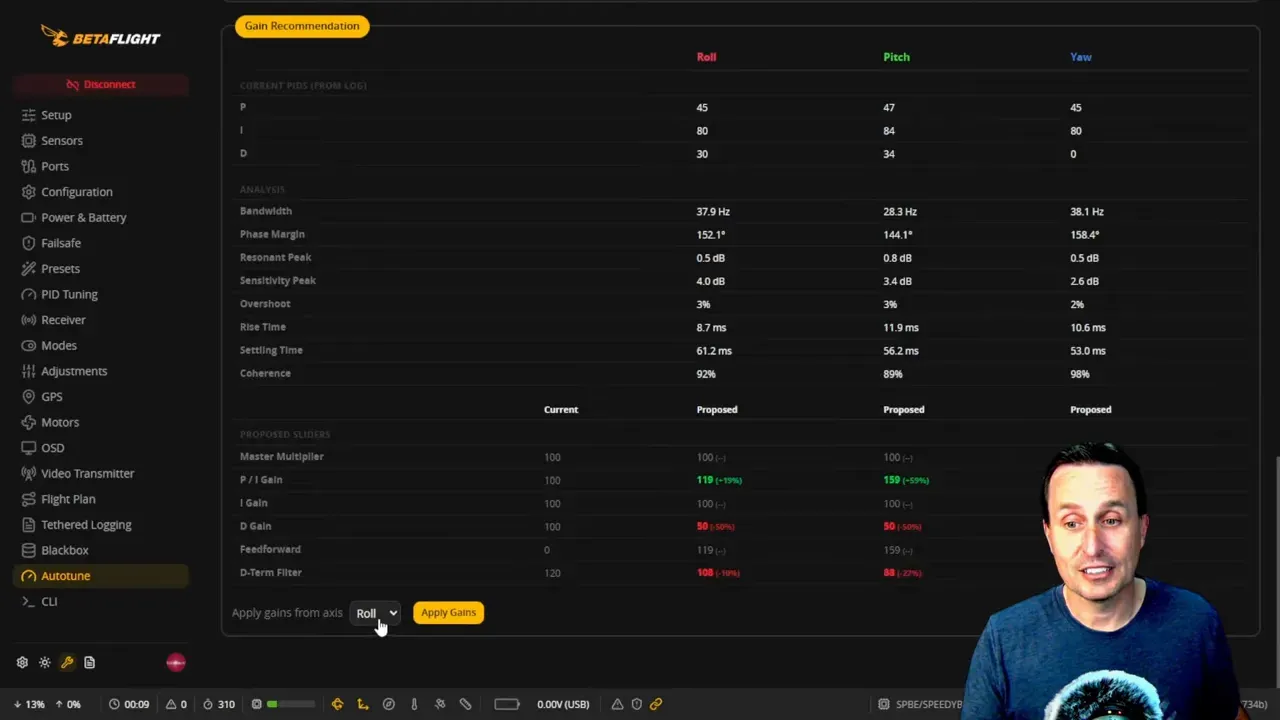
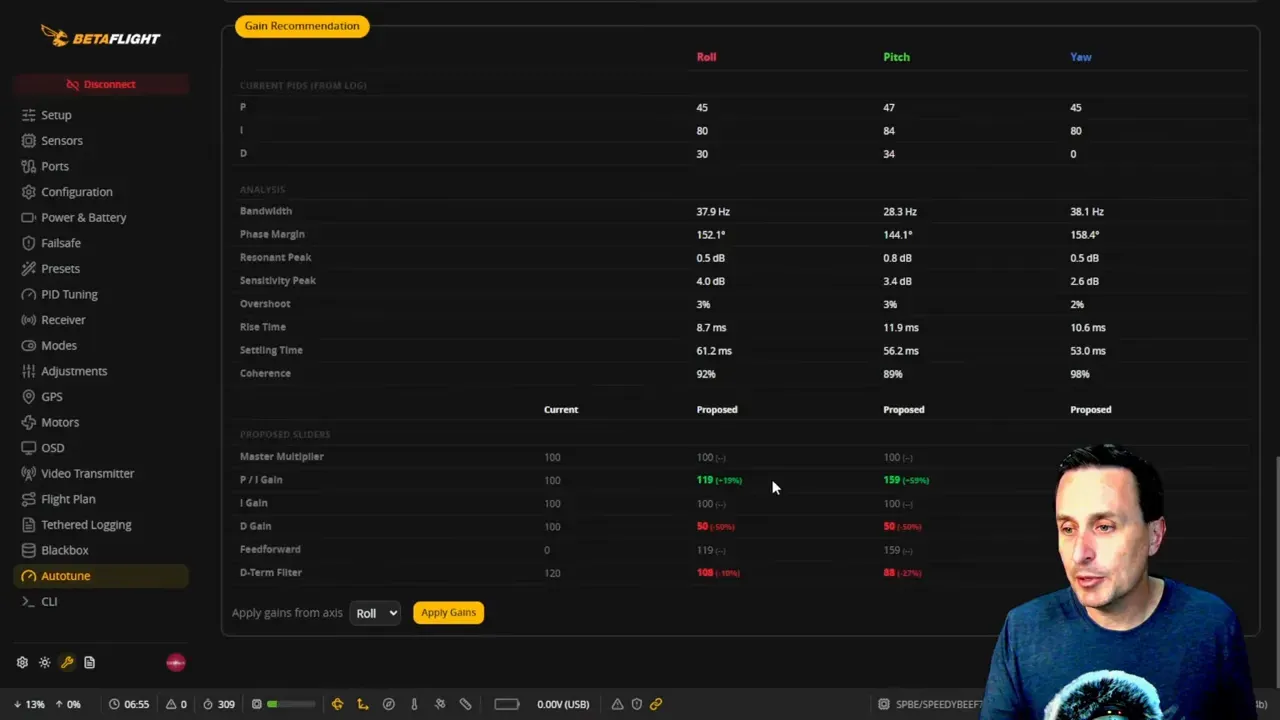
The analyser suggests slider changes for tracking, damping and D-term filter settings. It can also apply them directly if a flight controller is connected. In theory, that sounds excellent. In practice, the example recommendation cut the damping slider heavily and produced a worse result.
After applying the suggested values, the follow-up chirp log showed a hump in the magnitude response, increased instability risk near the sensitivity limit, and a step response full of oscillation. In plain English, the software took a decent tune and made it look rather ill.
There is also a more structural limitation. The current tool does not properly differentiate roll and pitch slider application in the automated path, even though the analysis clearly shows axis-specific mismatches. That matters, because many quads need different pitch and roll treatment.
So yes, the recommendations exist. No, they are not yet something to trust on reputation alone.
Can you safely click Apply gains in Betaflight Autotune?
No, not blindly. In the tested beta, clicking the apply button caused settings changes that deserve adult supervision.
One issue observed was that the pitch and roll slider toggle ended up disabled. Another, far worse one, was that pitch-axis PID-related values were set to zero. That would leave the pitch axis with no useful PID gains, which turns take-off into an experiment nobody asked for.
It also altered D-term related settings and filter slider behaviour in ways that were not confidence inspiring. This is beta code in the literal sense, not the usual “finished enough for marketing” sense.
The correct approach for now is to read the recommendations manually, cross-check them against the graphs, then make deliberate changes in PID Tuning. Do not trust the button with your only set of motors.
Is Betaflight Autotune worth using right now?
Yes, as an analysis tool. No, as a one-click tuning wizard.
That is the core verdict. The chirp workflow, the graphs and the numerical analysis already provide useful information. They can show whether an axis is weak, how much tuning margin remains, and whether the quad is tracking cleanly.
What it does not yet do well enough is convert that analysis into reliable automatic slider changes. That part still looks half-baked. Promising, but half-baked.
For experienced tuners, this is still good news. It compresses a fair bit of Blackbox interpretation into one page and makes trends easier to spot. For less experienced pilots, it is not yet a replacement for understanding what P, I and D are doing.
If the feature matures, the endgame is obvious and very appealing: fly a chirp routine, import the log, apply sensible values, repeat once, done. Betaflight is not there today, but it is at least pointed in the correct direction.
For broader reading around FPV gear and firmware, the FPV category on the Unmanned Tech blog is a useful rabbit hole, provided there is enough tea available.
FAQ
Does Betaflight Autotune work in the stable release?
No. The feature shown here is in the Betaflight master branch intended for the 2026 release. It is not part of the 2025.12 stable release.
Why is Betaflight Autotune not working after flashing?
The most likely causes are missing chirp support at flash time, no Chirp mode assigned to a switch, or Blackbox debug mode not set to chirp. Any one of those can prevent a usable autotune log.
Can Betaflight Autotune be used in angle mode?
Yes, but it is not ideal. Angle mode adds cross-axis stabilisation inputs, which can contaminate the chirp data. Acro mode gives cleaner input because the quad only sees commanded movements and natural response.
What coherence percentage is good in Betaflight Autotune?
High 80s to 90s is the target. That indicates the chirp signal is being captured clearly enough for the analysis to be trustworthy.
Can Betaflight Autotune tune a big 10-inch or 15-inch drone?
Not safely from defaults in many cases. Large drones can be far enough from Betaflight’s default assumptions that they may crash on take-off unless basic tuning, especially I gain reduction, is handled first.
Should blackbox_high_resolution be turned on for chirp?
The Betaflight help material suggests yes, but UAV Tech recommends caution for now. With that option enabled, Blackbox Explorer does not scale setpoint correctly in the tested setup, and the extra precision did not appear necessary.
Why should stick response and dynamic damping be set to zero first?
Those features can obscure the core chirp analysis. Setting them to zero gives a cleaner baseline so the autotune graphs reflect the underlying PID behaviour rather than extra response shaping.
Is the Apply gains button safe to use?
Not in the tested beta. It changed settings in ways that were not sensible, including zeroing pitch-related gains in one case. Manual review is the safer route for now.
Key specs and claims mentioned
- Confirmed in the video: Betaflight Autotune is present in the master branch for the 2026 release.
- Confirmed in the video: It is not in the 2025.12 stable release.
- Confirmed in the video: Chirp must be selected during flashing.
- Confirmed in the video: Chirp mode must be assigned to a switch.
- Confirmed in the video: Blackbox logging is required.
- Confirmed in the video: Blackbox debug mode should be set to chirp.
- Confirmed in the video: Stick response slider should be set to 0 before the test flight.
- Confirmed in the video: Dynamic damping slider should be set to 0 before the test flight.
- Confirmed in the video: The chirp routine sweeps up to about 600 Hz.
- Confirmed in the video: A rough instability threshold discussed is around 6 dB on the sensitivity metric.
- Confirmed in the video: Example bandwidth values discussed were about 38 Hz on roll and 28 Hz on pitch.
- Not stated in the video: exact Betaflight commit, build number or configurator version.
Evidence gaps
- No bench test data beyond the demonstrated flight and log analysis was supplied.
- No exact Betaflight commit or firmware build identifier was stated.
- No direct release notes or upstream source links were supplied with the material.
Internal link opportunities
- Link to the Unmanned Tech Betaflight category page for related firmware setup and troubleshooting.
- Link to the Unmanned Tech FPV racing flight controller buying guide for Blackbox-capable hardware selection.
- Link to the Unmanned Tech FPV category page for related builds, reviews and setup articles.
This article was based from the video Betaflight AUTOTUNE! review